Baby Monitor Buying Guide for Malaysian Parents (2026)
11 Ogos 2026
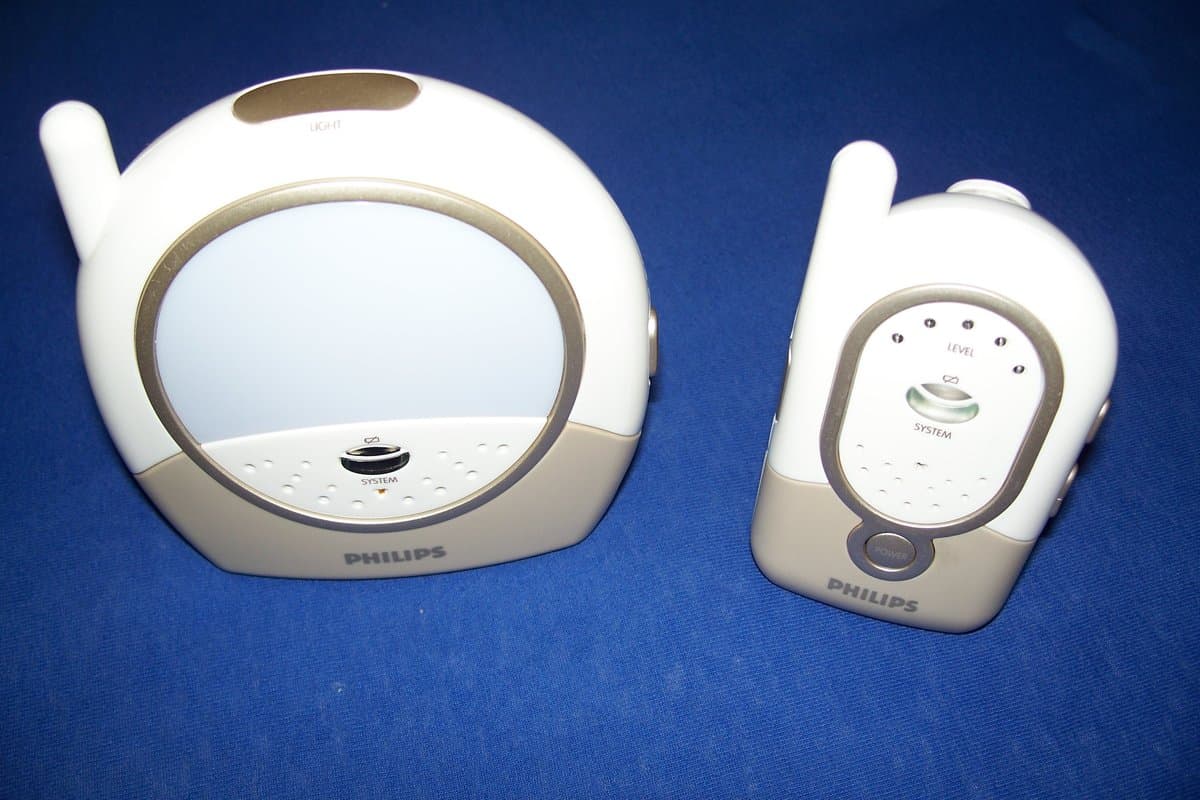
Everything Malaysian parents need to know about choosing a baby monitor — audio vs video vs WiFi, night vision, temperature displays, two-way talk-back, privacy security, and the features that actually matter for peace of mind.
Why Every Malaysian Parent Needs a Baby Monitor
There is a universal experience among new parents: the compulsion to check on your sleeping baby every few minutes. Is she breathing? Is he too hot? Did she roll over? Is he still asleep? The anxiety never fully goes away, but a good baby monitor can give you the peace of mind to get things done — or simply sit down and breathe — without physically being in the nursery.
In Malaysia, where many families live in landed homes with multiple floors or in condominiums with bedrooms separated from living spaces by walls and doors, a baby monitor becomes almost essential. It bridges the distance between parent and child, allowing you to hear or see your baby from anywhere in the house.
But the market has exploded with options. Basic audio-only monitors have given way to high-definition video monitors, WiFi-connected smart monitors, wearable devices, and monitors that track breathing, movement, sleep patterns, and even room conditions. How do you choose?
This guide breaks down everything Malaysian parents need to know about baby monitors in 2026 — the types available, key features to look for, price ranges you can expect, and practical advice to help you pick the right one for your family.
Types of Baby Monitors
There are four main categories of baby monitors available in Malaysia today. Understanding the differences is the first step to choosing wisely.
1. Audio Monitors
The original baby monitor design, and still widely used. Audio monitors consist of a baby unit (placed near the crib) and a parent unit (carried by the parent). When the baby makes a sound, the parent unit transmits it in real-time.
How they work: The baby unit has a microphone that picks up sounds in the nursery. The parent unit has a speaker and receives the audio transmission. Most use radio frequencies (typically DECT technology for clear, interference-free transmission).
Pros:
- Most affordable option (RM 80–250)
- Simple and straightforward to use
- Long battery life on parent unit (often 10–20 hours)
- No WiFi required — no privacy concerns, works with any internet connection
- Reliable range within the home
Cons:
- Cannot see your baby — only hear
- Limited features beyond audio
- Some models have background hiss or interference
- Range limitations in large homes
Best for: Budget-conscious parents, small homes or apartments, parents who prefer simplicity over bells and whistles.
Popular models in Malaysia:
- Philips Avent SCD503/505 (RM 150–200) — Classic DECT audio monitor
- Motorola MBP8 (RM 120–180) — Compact, reliable audio-only
- VTech DM221 (RM 100–150) — Budget-friendly with good range
2. Video Monitors
Video monitors add a camera to the baby unit, allowing you to see your baby on a handheld parent unit with a display screen. Most also include audio transmission.
How they work: A camera captures video of the crib and transmits it wirelessly to a parent unit with an LCD screen. The transmission typically uses 2.4GHz WiFi-like frequencies or dedicated FHSS (Frequency Hopping Spread Spectrum) technology for privacy and security.
Pros:
- See your baby, not just hear — crucial for checking position, breathing, and safety
- Many include infrared night vision for monitoring in darkness
- Temperature sensors in some models
- Two-way talk-back feature lets you soothe your baby remotely
- Pan, tilt, and zoom cameras in premium models
Cons:
- More expensive than audio-only (RM 250–1,200)
- Shorter battery life on parent unit (4–8 hours typical)
- Screen quality varies significantly by price point
- Some models can be hacked if not properly secured (WiFi models)
Best for: Parents who want visual reassurance, especially during the first year when babies move around in their sleep; parents of twins or multiples who need to monitor multiple cribs.
Popular models in Malaysia:
- Infant Optics DXR-8 Pro (RM 450–650) — Interchangeable lens system, excellent battery
- Motorola MBP36XL (RM 500–700) — Large 5-inch display, pan-tilt-zoom
- Nanit Plus (RM 800–1,200) — HD video, sleep analytics (premium option)
3. WiFi / Smart Monitors
WiFi monitors connect to your home internet network and allow you to view your baby through an app on your smartphone, tablet, or computer. Some also integrate with smart home systems.
How they work: The camera connects to your home WiFi network and streams video and audio to a cloud service or directly to your device via a dedicated app. You can view your baby from anywhere with internet access — not just within your home.
Pros:
- Monitor from anywhere — at work, on holiday, at a restaurant
- No parent unit to carry or lose — use your existing smartphone
- Often higher resolution video (720p–1080p)
- Many offer advanced features: sleep tracking, breathing monitoring, two-way audio
- Multi-user access — both parents can monitor simultaneously
- Integration with smart home ecosystems (Google Home, Alexa, Apple HomeKit)
Cons:
- Most expensive category (RM 400–2,500)
- Dependent on reliable WiFi — network issues mean no monitoring
- Privacy and security concerns if not properly secured
- Cloud storage often requires subscription fees
- Higher latency than dedicated monitors — slight delay in live feed
- Requires smartphone to be on and unlocked to monitor
Best for: Tech-savvy parents, working parents who want to check in from the office, parents with irregular schedules, those who want advanced analytics and sleep tracking.
Popular models in Malaysia:
- Nanit Pro (RM 1,200–1,800) — HD camera, breathing motion tracking, sleep analytics
- CuboAi Plus (RM 900–1,300) — AI-powered safety alerts, sleep insights
- Owlet Cam (RM 700–900) — HD video, two-way audio, integrates with Owlet sock
- Motorola VM65 Connect (RM 400–600) — Budget-friendly WiFi option
4. Movement and Breathing Monitors
These specialised monitors track your baby's physical movements or breathing patterns and alert you if no movement is detected for a specified period (typically 15–20 seconds).
How they work: There are two main types:
Sensor pad monitors: A thin sensor pad is placed under the crib mattress. It detects movement, including breathing motions, and sounds an alarm if no movement is detected for a set period.
Wearable monitors: A sock, band, or clip is attached to the baby's foot or clothing. It uses pulse oximetry (measuring oxygen saturation and heart rate) to track breathing and circulatory health.
Pros:
- Provide peace of mind for parents worried about SIDS (Sudden Infant Death Syndrome)
- Can alert you to potentially dangerous situations
- Useful for premature babies or infants with health conditions
- Many integrate with video monitors for complete coverage
Cons:
- Most expensive single-purpose devices (RM 300–1,200 for sock/pad, plus camera)
- Can generate false alarms (babies sometimes stop breathing momentarily during normal sleep patterns)
- Sensor pads can be triggered by movement outside the crib (vibrations, fans, air conditioning)
- Wearables can be uncomfortable or fall off
- Some medical professionals question their necessity for healthy, full-term babies
Best for: Parents of premature infants or babies with health conditions, parents with severe anxiety about SIDS, families with a history of SIDS.
Popular models in Malaysia:
- Owlet Smart Sock 3 (RM 800–1,000) — Wearable sock with heart rate and oxygen monitoring
- Angelcare AC527 (RM 350–450) — Sensor pad under mattress with audio/video
- Snuza Hero (RM 200–300) — Clip-on movement monitor
Audio vs Video vs WiFi vs Movement: Quick Comparison
| Feature | Audio | Video | WiFi/Smart | Movement |
|---|---|---|---|---|
| Price range | RM 80–250 | RM 250–1,200 | RM 400–2,500 | RM 300–1,200 |
| Can see baby | No | Yes | Yes | No (unless integrated) |
| Can hear baby | Yes | Yes | Yes | Sometimes |
| Works without internet | Yes | Yes (non-WiFi models) | No | Yes |
| Remote access | No | No | Yes | No |
| Privacy concerns | Low | Low (non-WiFi) | Medium-High | Low |
| Battery life (parent unit) | 10–20 hours | 4–8 hours | N/A (uses phone) | Varies |
| Range | 50–300m | 50–300m | Unlimited (with internet) | N/A |
| Sleep analytics | No | Some | Many | Some |
| Subscription fees | No | No | Sometimes | No |
| Best for | Budget, simplicity | Visual reassurance | Remote monitoring, advanced features | SIDS anxiety, health concerns |
Key Features to Look For
Night Vision
This is non-negotiable for video and WiFi monitors. Your baby will sleep in darkness, and you need to see them clearly without turning on lights. Look for monitors with:
- Infrared LEDs that automatically activate in low light
- Clear night vision range — at least 3–5 metres is good, 8+ metres is excellent
- Black-and-white or colour night vision — colour is clearer but not essential
Temperature Display
Many video and WiFi monitors include a temperature sensor in the baby unit. The parent unit or app displays the nursery temperature in real-time. This is particularly valuable in Malaysia's tropical climate, where:
- Air conditioning can make rooms too cold
- Lack of ventilation can make rooms stuffy and hot
- The ideal nursery temperature is 18–22°C (65–72°F)
A temperature display lets you adjust the air conditioner, fan, or window openings without disturbing your baby.
Two-Way Talk-Back
This feature lets you speak to your baby through the monitor. A microphone on the parent unit or app transmits your voice to a speaker on the baby unit.
Why it matters:
- Soothe your baby back to sleep without entering the room
- Sing lullabies or talk gently from another room
- Tell older toddlers to lie down without confrontation
- Reassure your baby when they wake up startled
Pan, Tilt, and Zoom
Premium video monitors and WiFi cameras offer remote control of the camera's position and zoom level.
- Pan — Rotate the camera left/right
- Tilt — Angle the camera up/down
- Zoom — Magnify the image digitally
This is useful for:
- Following a moving baby who can crawl or stand
- Checking on different areas of the room
- Getting a closer look at something concerning
Look for 360° pan and 120° tilt for maximum coverage.
Lullabies and White Noise
Some monitors have built-in speakers that can play pre-loaded sounds: lullabies, nature sounds, white noise, or womb sounds.
Pros:
- Helps soothe babies to sleep
- Consistent white noise can mask household sounds
- No need for a separate sound machine
Cons:
- Sound quality is often mediocre
- Limited variety of sounds
- Many parents prefer dedicated sound machines with better audio
Split Screen (for Twins or Two Children)
If you have twins or two children close in age sharing a room, or if you want to monitor two different rooms, a split-screen monitor allows you to view two camera feeds simultaneously on the same parent unit.
Look for monitors with:
- Dual camera support — can connect two baby units
- Split-screen display — shows both feeds side-by-side
- Auto-scan mode — alternates between cameras every few seconds
Smartphone App Quality (WiFi Monitors)
For WiFi monitors, the app is your primary interface. A poorly designed app can ruin an otherwise excellent product. Look for:
- Stable connection — rarely drops or freezes
- Low latency — minimal delay between live action and what you see
- Clear video quality — even on slower connections
- Easy navigation — intuitive menus and controls
- Reliable alerts — push notifications for sound, motion, or temperature
- Multi-device support — works on both iOS and Android
- Offline mode — some apps allow local viewing without internet
Battery Life
Consider how you will use the monitor:
- Home use with power outlet nearby — battery life matters less
- Carrying the parent unit around the house — look for 8+ hours
- Travel or use without easy charging — prioritize battery life
Typical battery life by type:
- Audio monitors: 10–20 hours
- Video monitors: 4–8 hours
- WiFi monitors: N/A (uses your phone's battery)
Range and Connectivity
The effective range determines how far you can go from the baby unit while maintaining a reliable connection.
- Audio monitors: 50–300 metres (varies by walls, interference)
- Video monitors: 50–300 metres (similar to audio)
- WiFi monitors: Unlimited (anywhere with internet)
Factors that affect range:
- Thick concrete walls (common in Malaysian homes)
- Metal structures and appliances
- Other wireless devices (routers, microwaves, other monitors)
- Electrical interference
For large landed homes or multi-storey houses, prioritize monitors with longer range or consider a WiFi model.
Expandability
Some monitor systems allow you to add additional cameras or parent units over time. This is valuable if you:
- Plan to have more children
- Want to monitor multiple rooms
- Need a second parent unit for another caregiver
Look for systems that support 4–8 cameras and 2–4 parent units.
Privacy and Security: What Every Parent Should Know
The Risk
WiFi-connected baby monitors have been hacked. It happens. Unsecured cameras can be accessed by strangers, who can watch, listen, and even speak to your baby. This is terrifying, but also largely preventable with proper setup.
How to Secure Your Monitor
-
Change the default password — Immediately after setup, create a strong, unique password. Default passwords like "1234" or "admin" are how most hacks happen.
-
Enable two-factor authentication (2FA) — If your monitor supports it, turn it on. This adds an extra layer of security.
-
Keep firmware updated — Manufacturers release security patches regularly. Enable auto-updates or check for updates monthly.
-
Use a secure WiFi network — Don't connect your monitor to public WiFi. Use your home network with WPA2 or WPA3 encryption.
-
Disable remote access if not needed — If you only monitor within your home, disable remote viewing to reduce attack surface.
-
Check for unknown users — Periodically review the app's connected devices list and remove any you don't recognize.
-
Consider non-WiFi for maximum security — If privacy is your top priority, audio or dedicated video monitors (which don't connect to the internet) are inherently more secure.
What to Do If Your Monitor Is Hacked
- Immediately disconnect the monitor from power and WiFi
- Change your password and enable 2FA
- Contact the manufacturer — they may need to investigate
- Report the incident if data was accessed or if threats were made
When Do You Actually Need a Monitor?
Not every parent needs a baby monitor. Consider your living situation and parenting style.
You Need a Monitor If:
- Your baby sleeps in a separate room — especially on another floor
- You live in a multi-storey home — bedrooms are distant from living areas
- Your baby has health concerns — prematurity, respiratory issues, sleep apnea
- You have severe anxiety about SIDS or your baby's safety
- You are a light sleeper — and want to avoid unnecessary checks that wake you
- You have other children — and can't be in the nursery constantly
You Might Not Need a Monitor If:
- Your baby sleeps in your room — you can hear them without technology
- You live in a small apartment — sound carries easily between rooms
- You are a heavy sleeper — a monitor won't wake you anyway
- You prefer co-sleeping — your baby is within arm's reach
The Malaysian context: Many Malaysian homes have a designated nursery separate from the master bedroom, especially in landed properties and newer condominiums. In these cases, a monitor is practically essential. However, if you practice room-sharing with your baby in the first 6–12 months (as recommended by many paediatricians), a monitor may be less critical during that period.
Budget Guide: How Much Should You Spend?
| Budget | What You Can Expect | Who It's For |
|---|---|---|
| Under RM 200 | Basic audio monitor with decent range and DECT technology | Budget-conscious parents, small homes, first-time parents testing the waters |
| RM 200–RM 500 | Good video monitor with night vision, temperature display, basic pan-tilt | Most parents — sweet spot of features and value |
| RM 500–RM 1,000 | Premium video monitor with large screen, advanced features (sleep tracking, breathing) OR reliable WiFi monitor with HD video | Parents who want visual reassurance plus convenience, tech-savvy parents |
| RM 1,000–RM 2,000 | High-end WiFi monitor with AI features, sleep analytics, breathing monitoring | Parents who want the most comprehensive monitoring available |
| RM 2,000+ | Complete systems: WiFi monitor + breathing sock + sound machine + smart home integration | Parents who want a fully integrated nursery ecosystem |
Money-saving tips:
- Wait for sales — Shopee and Lazada Mega Campaigns (March, June, August, November, December) often have 20–40% discounts
- Consider bundles — Some sellers bundle monitors with free accessories (extra cameras, mounts, chargers)
- Buy from reputable sellers — Counterfeit monitors are common; buy from official brand stores or authorised dealers
- Check warranty — Ensure local warranty coverage, not international warranty that requires overseas shipping
- Consider second-hand — Audio monitors and basic video monitors are often safe to buy second-hand (sanitise thoroughly). Never buy second-hand movement/breathing monitors — sensors can degrade over time.
Where to Buy Baby Monitors in Malaysia
- Shopee Malaysia — Widest selection, frequent sales, competitive pricing. Look for Official Stores for authenticity.
- Lazada Malaysia — Similar range to Shopee, often with bundle deals. LazMall guarantees authentic products.
- Physical baby stores — Kiddy Palace, Mamours, Happikiddo, and Motherhood stores let you see parent units in person.
- Electronics stores — Harvey Norman, Senheng, and Best Denki sometimes carry premium video monitors.
- Direct from brands — Some brands (Nanit, Owlet) sell directly through their websites.
Common Mistakes to Avoid
1. Placing the Monitor Too Close to the Crib
The baby unit should be at least 1–2 metres away from the crib. Too close, and:
- The camera angle is too narrow
- The microphone picks up breathing sounds (which can be concerning but normal)
- Cords become a strangulation hazard
- The screen light can disturb the baby
2. Ignoring Cord Safety
Monitor cords pose a strangulation risk. Follow these rules:
- Never place the baby unit within the baby's reach
- Secure cords with cord covers or tape along walls and furniture
- Keep cords away from the crib — at least 1 metre away
- Use battery-powered units when possible to eliminate cords entirely
3. Relying on Monitors for SIDS Prevention
No baby monitor can prevent SIDS. Movement and breathing monitors can alert you to prolonged apnea, but:
- They do not prevent SIDS from occurring
- False alarms are common and can cause unnecessary anxiety
- Some medical professionals argue they provide a false sense of security
The best SIDS prevention: Follow safe sleep guidelines (back sleeping, firm mattress, no loose bedding, no toys in crib, room-sharing).
4. Over-Reacting to Every Sound
New parents often check on their baby every time they hear a peep. Most baby noises are normal:
- Grunting, squeaking, and whimpering — normal sleep sounds
- Occasional brief pauses in breathing — normal periodic breathing in infants
- Stirring and repositioning — healthy sleep behaviour
Unless you hear prolonged crying, gasping, or no sound for an extended period, try to resist the urge to intervene. Babies need to learn to self-soothe.
5. Choosing WiFi When You Don't Need It
WiFi monitors are impressive, but they're overkill if you only monitor within your home. You're paying for features you won't use, taking on privacy risks, and depending on internet connectivity. For many Malaysian parents, a good video monitor without WiFi is the better choice.
Frequently Asked Questions
Are baby monitors worth it?
For most Malaysian parents, yes. The peace of mind of being able to hear or see your baby from anywhere in the house is invaluable, especially in multi-storey homes or when the nursery is far from living areas. The cost is small compared to the reduction in anxiety.
Can I use a regular security camera instead of a baby monitor?
You can, but dedicated baby monitors offer features that security cameras don't: temperature displays, two-way talk-back, lullabies, night vision optimised for cribs, and parent units designed for continuous monitoring. Security cameras are often better suited to occasional monitoring than all-night supervision.
How long do I need to use a baby monitor?
There is no fixed age when monitors become unnecessary. Many parents use them until their child:
- Sleeps through the night consistently (usually 6–12 months)
- Can call for help when they wake up (around 18 months–2 years)
- Moves to a toddler bed (usually 2–3 years)
Some parents continue using monitors as toddlers approach preschool age, especially if the child has a habit of getting out of bed unsupervised.
Can I use two baby monitors in the same house?
Yes, but be aware of potential interference. If both monitors use the same frequency (common with 2.4GHz models), they may interfere with each other. Look for monitors with:
- DECT technology — operates on a different frequency, less interference
- Channel selection — ability to switch channels to avoid conflicts
- Digital transmission — less susceptible to interference than analog
Do breathing monitors actually prevent SIDS?
No monitor can prevent SIDS. Breathing monitors can alert you to prolonged apnea, but there is no evidence they reduce SIDS risk. They may provide peace of mind for anxious parents, but they should not be considered a safety device. Follow established safe sleep guidelines instead.
Is it safe to leave a monitor on all night?
Yes, that's what they're designed for. However:
- Audio monitors can be muted when you're confident the baby is sleeping soundly
- Video monitors with screens should have the screen off (audio-only) to save battery and reduce light exposure
- WiFi monitors may drain your phone's battery if streaming continuously — consider using a dedicated tablet
What should I do if my monitor stops working?
- Check the power — ensure both units are charged or plugged in
- Check the connection — re-pair the units if necessary
- Check for interference — move away from other wireless devices
- Reset the units — most have a reset button or procedure in the manual
- Contact customer support — if the issue persists, especially within warranty
Final Thoughts
A baby monitor is one of those purchases that falls squarely in the "nice to have" category — until you have one, at which point it becomes "how did I live without this?"
For Malaysian parents navigating the challenges of raising a child in our tropical climate, multi-storey homes, and busy lifestyles, a good monitor is more than a convenience — it's a tool that reduces anxiety, increases parental freedom, and helps you respond quickly when your baby needs you.
The right monitor for you depends on:
- Your budget — Set a realistic range and stick to it
- Your home layout — Large landed home? Small apartment? Multi-storey?
- Your priorities — Visual reassurance? Sleep analytics? Maximum security?
- Your tech comfort level — Are you comfortable with apps and WiFi, or do you prefer simplicity?
- Your baby's needs — Health concerns? Twins? Light sleeper?
Whatever you choose, remember that the best monitor is the one you will actually use consistently. A RM 2,000 AI-powered smart monitor that sits in the box because you find it complicated is less useful than a RM 150 audio monitor that gives you basic reassurance every night.
Your baby will grow up faster than you can imagine. These early years, filled with sleepless nights and constant checking, are fleeting. A good monitor helps you navigate them with a little more peace of mind — and a little more sleep.
Have questions about choosing a baby monitor? Drop a comment below or check out our other baby gear guides for more tips tailored to Malaysian parents.